Self-hosting
Production deployment guide. widemem is built local-first, which makes it easy to run inside a VPC, an air-gapped network, or on regulated infrastructure.
Architecture you are deploying
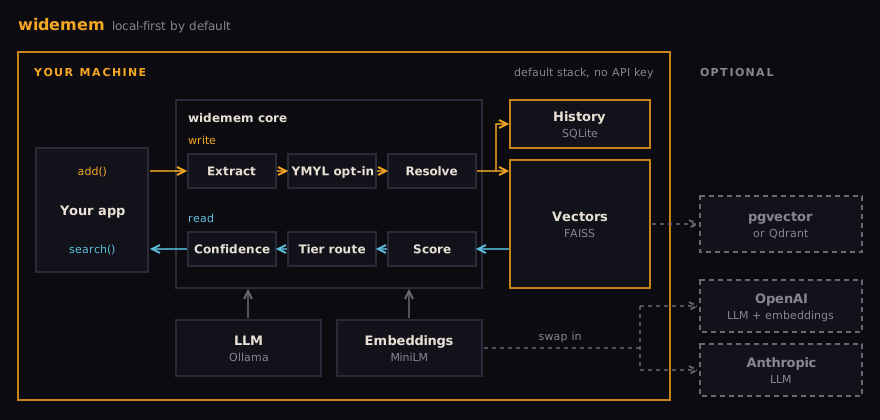
A default widemem install is one Python process, a local Ollama server for the LLM, and its on-disk state:
~/.widemem/history.db: SQLite database holding the full audit log of every add, update, and delete operation.- The FAISS vector index, embeddings plus metadata. It persists only when you give
VectorStoreConfigapath(step 2 below); widemem then writesindex.faissandstate.jsoninto that directory and loads them at startup. Without apath, vectors live in RAM and are gone when the process exits. The MCP server sets this for you: it keeps vectors in~/.widemem/data/faissand history in~/.widemem/data/history.db. - Optionally, a
~/.widemem/extractions.dbSQLite file if you enable self-supervised extraction data collection.
There are zero background services besides Ollama, no external API calls after the one-time MiniLM download, and zero telemetry. widemem does not phone home. The defaults (Ollama for the LLM, sentence-transformers for embeddings) are air-gap capable: after the first run has downloaded the MiniLM embedding model, set HF_HUB_OFFLINE=1. Data leaves your machine only if you configure a cloud provider.
Production setup
1. Install into a pinned virtual environment
Pin the exact version. widemem follows semantic versioning but production should not chase minor releases automatically. Then pull the default model on the same host: ollama pull llama3.1:8b (4.9 GB).
2. Choose a data directory you control
Put the data directory on a volume you back up. Set filesystem permissions so only your service user can read or write it. See the security page for the full scope statement.
3. Run widemem as a service
widemem is a library, not a daemon. You embed it inside whatever service holds your agent logic (FastAPI, Flask, a job worker, your own stdio bridge). The simplest production pattern is to wrap it in a FastAPI app and run that under a process supervisor (systemd, Supervisor, Kubernetes).
4. systemd unit (example)
The default stack needs no API key. Uncomment a key line only when you switch a provider to the cloud, and drop HF_HUB_OFFLINE=1 until the MiniLM model has been downloaded once.
Backup and restore
widemem ships with export_json() and import_json() for portable backup and restore.
For a full point-in-time snapshot, back up the data directory (/var/lib/widemem/) with your existing filesystem backup tool. The SQLite files are WAL-safe if you use a consistent snapshot (LVM, ZFS, or stopping the service briefly).
Scaling guidance
FAISS in the default configuration handles roughly 100k to 1M memories per process before latency becomes noticeable on commodity hardware. Beyond that, swap the vector store to Qdrant or pgvector.
widemem connects to Qdrant on localhost:6333, or runs it embedded when you pass a path; it does not read a remote Qdrant URL. For a shared database in your VPC, use pgvector. Nothing else in the pipeline changes.
Operations
Monitoring
The library does not ship a Prometheus exporter yet. In the meantime, wrap your add and search calls with your service's existing metrics instrumentation. Latency, error rate, and memory count are the three signals that matter.
Cost control
LLM calls happen during add(): up to two per call, fact extraction then conflict resolution. On the local default there is no per-call bill; the cost is compute. On an Apple M4 with 32 GB, an add() took 5 to 17 seconds and a search 0.04 seconds, and sentence-transformers brings PyTorch (about 550 MB on macOS; more on Linux with CUDA wheels). If you switch to GPT-4o-mini, a rough budget for ingesting 1,000 turns of conversation is $0.40 to $0.60. Use the add_batch() call when ingesting bulk data.
Upgrading
Read the CHANGELOG before bumping versions. 2.0 moved the defaults from OpenAI to local. A 1.x deployment that relied on the OpenAI default built a 1536-dimension FAISS index or Qdrant collection, which will not open under the 384-dimension default embedder. To keep it, set provider="openai" on both LLMConfig and EmbeddingConfig (for the MCP or REST server, WIDEMEM_LLM_PROVIDER=openai and WIDEMEM_EMBEDDING_PROVIDER=openai), and add the [openai] extra, which is no longer a core dependency.
A tested Docker image and docker-compose.yml (one service, or widemem plus Ollama for fully-local) is the next shipment. Until then, a pip install into a venv plus a systemd unit is the production path.
Compliance stance
widemem is Apache 2.0, open source, local-first, and phones no home. It is not itself SOC2 or HIPAA certified because it is a library, not a service. The compliance posture of the deployment is yours. The library gives you the building blocks: local storage, configurable retention via ttl_days, full audit trail via get_history(), and the ability to run the LLM and embedding sides locally so no data ever leaves your perimeter.
For teams deploying into regulated environments (healthcare, finance, government) that want a support contract and dedicated help with the compliance review, the enterprise page is where to start.